
Use SkeuDesign in ChatGPT
Now available · ChatGPT plugin
Your icon library,
inside ChatGPT.
Ask for icons for your next website, app, or presentation. Compare previews, collect a matching set, and export PNGs right in ChatGPT.
Up to 20 free icons per category. No purchase required.
Already a lifetime customer? Connect the same account to access your full library. This plugin is for library icons; custom generation stays on SkeuDesign.
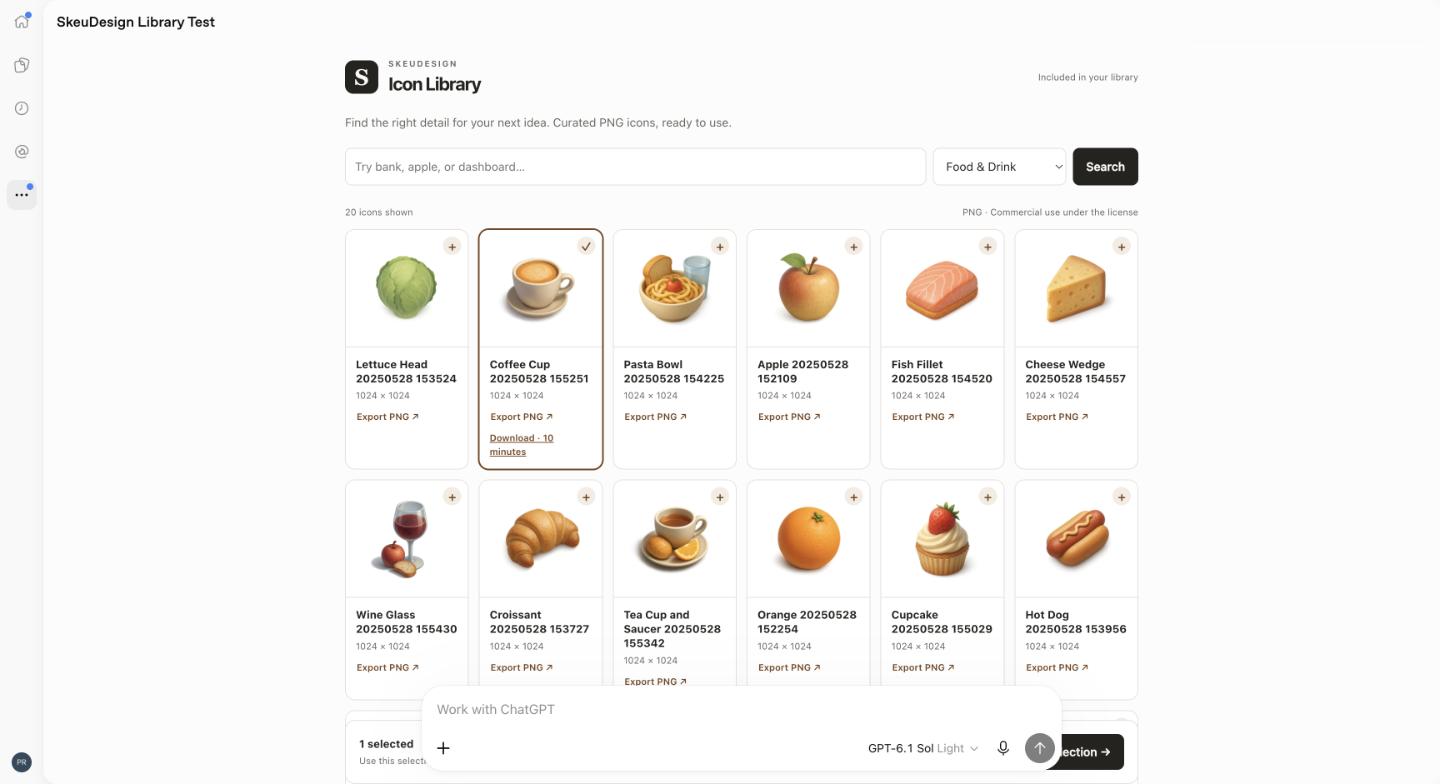
Connect once. Start exploring.
- Install the published SkeuDesign plugin in ChatGPT.
- Connect an existing SkeuDesign account or create a free account during the connection flow. Lifetime customers should use the account associated with their purchase.
- Ask for icons, such as “@SkeuDesign Find icons for a finance dashboard.”
- Select favorites in Icon Library or Icon Tray, then export PNG files. Download links expire after ten minutes; request a fresh export if needed.
The free selection includes up to 20 fixed icons per category, with unlimited downloads of those included icons. Existing lifetime entitlements and active legacy subscriptions include the full collection. Library searches and exports use no generation credits. Custom generation is available on the SkeuDesign website. ChatGPT controls plugin availability for your ChatGPT account.
Read the launch article for examples and the full setup guide.
Connection and download support
Full library missing? Check that you linked the account associated with your purchase. Expired download? Export the icon again. Contact support@skeudesign.com for help.
We use your connected account to check library access and authorize downloads. Icon use follows our Terms and Conditions. See our Privacy Policy for information handling.