Product update · ChatGPT
SkeuDesign is now in ChatGPT: find, collect, and export 3D icons
Your icon library is now inside ChatGPT. Explore a free selection in every category, build a matching set, and export PNGs for your next project.
By SkeuDesign · · 5 min read
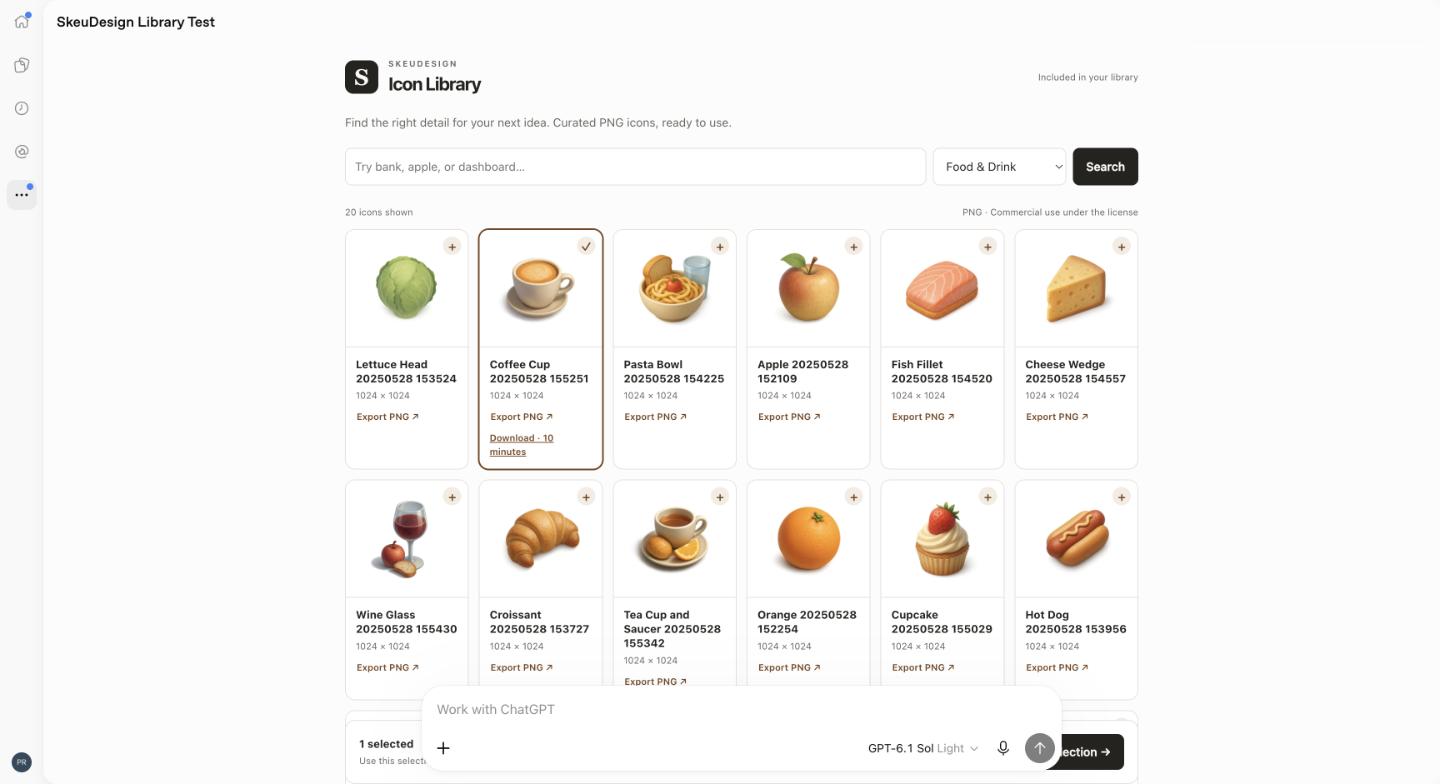
When you are planning a dashboard, building a website, or outlining a presentation in ChatGPT, the next step often involves finding the right visuals. SkeuDesign now brings its curated dimensional icon library into that conversation. The published SkeuDesign plugin lets you search for PNG icons, compare previews, collect a matching set, and export the files from ChatGPT.
This release focuses on the library. It helps you find existing assets for a project; custom icon generation and editing remain on the SkeuDesign website.
Start with free icons in every category
Every connected account can access a fixed, curated selection of up to 20 icons per category without a SkeuDesign subscription or purchase. You can download those same included icons as often as you need. It is a consistent selection, so returning to the library does not use up a monthly allowance or replace your previous favorites.
There are 144 categories in the launch library. Most include 20 free icons; smaller categories can include fewer. Explore subjects such as food and drink, finance, travel, technology, and everyday objects, then choose assets that fit your project.
Already own SkeuDesign Lifetime? Connect the account associated with your purchase to use your full library. Existing active legacy subscriptions also keep their library entitlement. Searching, previewing, and exporting library icons use no generation credits.
How to use SkeuDesign in ChatGPT
- Open the plugin listing. Visit SkeuDesign in ChatGPT and choose Install plugin. Sign in to ChatGPT if prompted.
- Connect your SkeuDesign account. Follow the account connection flow. Sign in to your existing account, or create a free account there. Lifetime customers should use the same email associated with their library.
- Describe what you need. Ask for icons for a specific screen, topic, or presentation. You can also ask SkeuDesign to open your icon library and browse visually.
- Compare and collect. Review the previews, select your favorites, and gather them in Icon Tray. Look for a consistent perspective, material, and level of detail across your set.
- Export your PNGs. Export selected files and follow the download links. Links expire after ten minutes; request a fresh export when needed.
ChatGPT controls plugin availability in your account. The free icon selection describes SkeuDesign access; your ChatGPT account and any applicable ChatGPT requirements still apply.
Three prompts to try first
A useful request names the project and the subjects you need. Start with one of these, then refine your selection after seeing the previews:
- “@SkeuDesign Find icons for a finance dashboard: savings, payments, and account security.”
- “@SkeuDesign Open my icon library so I can browse the categories.”
- “@SkeuDesign Find a matching set of food and drink icons for a café website.”
Once you have a shortlist, ask to collect your chosen icons in Icon Tray and export them. Naming an intended use helps narrow the search, but always check the actual results. At small sizes, a simpler silhouette may work better than an icon with lots of decorative detail.
From your conversation to your design
The library exports PNG images, so you can use the files in websites, apps, slides, and design tools that support raster images. A PNG is not a natively editable SVG. Check each asset’s dimensions, transparency, contrast, and visual fit in your final layout before publishing.
For example, you can plan the sections of a café website with ChatGPT, browse food and drink icons, choose a coffee cup and pastry that look consistent, and download them for your page. Keep icon labels clear and provide appropriate alt text when an image communicates information.
Commercial use follows the SkeuDesign Terms and Conditions. Review the applicable terms for your project, including any restrictions on redistribution. Connecting the plugin links your account for library access and downloads; see the Privacy Policy for how SkeuDesign handles information.
Need help connecting?
If your full library is missing, check that you connected the account associated with your purchase. For an expired download link, export the file again. Visit our ChatGPT setup and support page or email support@skeudesign.com if you need help.
Ready to find the visuals for your next idea? Install SkeuDesign, connect your account, and start with the free selection.